Overview
- Improve collaboration by ensuring colleagues get an automatic response from anyone who is unavailable
- Schedule automatic replies for users, or even whole teams, when you know they will be unavailable
- Requires little or no training to use offering a user interface that is simple and easy to use
- Improve customer service ensuring customers get an automatic response from anyone who is unavailable
- During the holiday periods, you can manage automatic replies for anyone who is away
- Easy to deploy and support for any number of users and in any size of organization
- Create reusable templates for common automatic replies and use merge fields for contact information
- When an employee calls in and is unable to make it into the office, you can enable an automatic reply
- Maximize your organization’s use of the automatic reply feature in Office 365 and Exchange Server
How it works
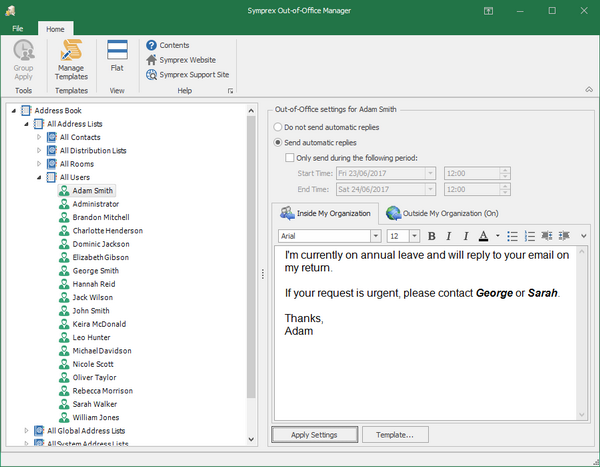
Browse address books, groups and users, and view, enable, schedule, disable and change automatic replies as required.
Use the group apply wizard for greater flexibility to apply new automatic replies, or enable, schedule or disable existing replies, for any number of mailboxes in one simple operation.
Create reusable templates with automatic replies, optionally using merge fields to include individual and correct contact information merged from your Active Directory, which can then be applied to any group or user at any time.
Automatic replies will always be sent to people inside your organization, but can be enabled or disabled for people outside of your organization, and if enabled, then enabled either for contacts only, or for anyone outside your organization.
Out of Office Manager is a simple, yet essential tool for any organization that uses Office 365 or Exchange Server.
Benefits
- Centrally manage automatic replies (also known as out of office replies) easily and efficiently
- Allow key staff to manage automatic replies for other users without needing mailbox access rights
- Templates with merge fields allow reusable replies with individual and correct contact information
- Can help improve customer service from consistent and better use of automatic replies
- Can help improve collaboration between staff thanks to better use of automatic replies
- Use Out of Office Extender (licensed separately) to reset the automatic reply sender list daily
Customers








What they say
“Out-of-Office Manager is a great time-saver and a great product!”
Jim McShane
Networks Infrastructure Specialist
Chivas Brothers, UK
“We use your administrative tools and they are great products!”
Mogens Lassen
IT Manager
Gråkjær, Denmark