Overview
- Maintain security policies enforcing permissions on mailbox and public folders according to business policies
- Share calendars allowing for example your reception to view the calendars of all relevant staff
- Report and analyse on delegates and folder permissions across your entire organization
- Improve collaboration and shared access by assigning and maintaining appropriate delegates to mailboxes
- Share contacts allowing for example all members of a group to view each other’s contacts
- Migrate delegates and permissions during Office 365 or Exchange Server migrations
- Assist users maintaining permissions on their folders so team members can access each other’s folders
- Apply to groups with flexible options to append, overwrite, replace and remove delegates and permissions
- Support other solutions that may require specific permissions on specific mailbox or public folders
How it works
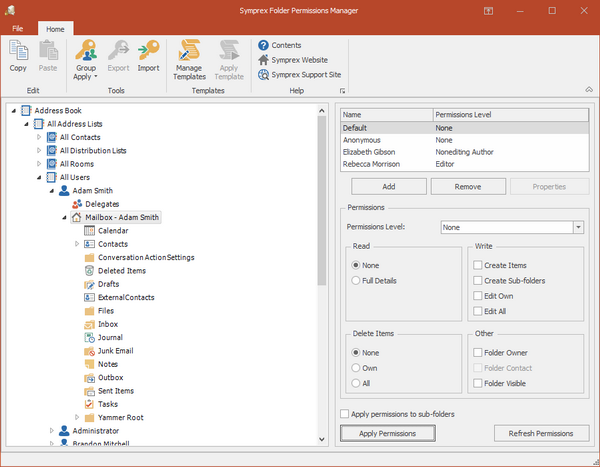
Browse address books, groups and users, and view and change delegates and folder permissions as required.
Use the group apply wizard for greater flexibility and append, overwrite, replace or remove delegates and permissions for any number of mailboxes or public folders.
Create reusable templates with delegates and folder permissions that can then be applied to any group or user at any time.
Export delegates or folder permissions for reporting or analysis in for example Excel, or for import during Office 365 or Exchange Server migrations.
Other features include copy/paste folder permissions, and a command-line utility to apply templates or export data, which can also be scheduled.
Folder Permissions Manager is an essential tool for any administrator in any organization that uses Office 365 or Exchange Server.
Benefits
- Centrally manage mailbox delegates
- Centrally manage mailbox folder permissions
- Centrally manage public folder permissions
- Improve employee productivity and efficiency through managed delegates and folder access
- Improve employee collaboration and sharing thanks to appropriate delegate and folder access
- Can help improve data security and availability through managed delegates and folder access
Customers








What they say
“One of the products we use a lot is Folder Permissions Manager. I could not live without it.”
Ryan Patriarca
Network Administrator
Reminger, USA
“Folder Permissions Manager is an excellent product. It will save us many hours of work in the future.”
Andrew Black
Director of IT
Robert Muckle Solicitors, UK