Overview
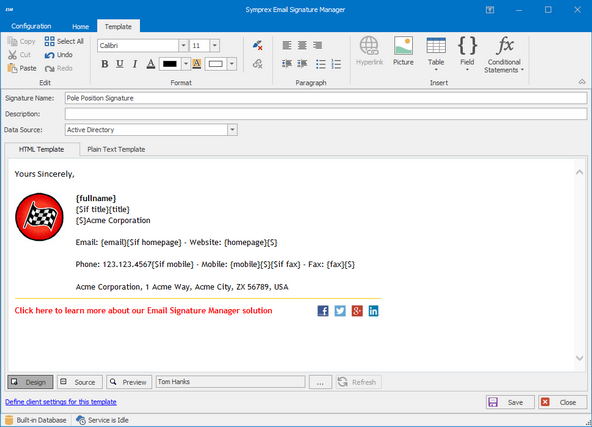
- Create and deploy email signatures to all users including contact details, corporate logos, social media icons and links, and even personalized content such as user photos
- Create and append email campaigns to tell everyone about awards, events or promotions, or set up scheduled marketing campaigns that run from time to time
- Create email disclaimers including for example company name, registered office address and registration details, which is a legal requirement for business email in many countries
- Apply different email signatures to different groups and users based on for example department or location, and append the relevant campaigns and disclaimers
- Deploy multiple signatures to users, such as send-on-behalf signatures, or to cover different roles or languages, for the user to choose between when using the Outlook desktop client
- Automatic signature updates ensure that your end users do not need to do anything for email signatures to work or be up-to-date with any design changes or new contact details
- Works on any device anywhere, including in Outlook on Windows, Outlook on Mac, Outlook on the Web, and any other email client on any device, including mobile devices
- Scalable enterprise solution designed from the ground up for on-premise Exchange Server environments and trusted by thousands of customers worldwide
- Signature 365 Migration Wizard allows for quick and easy migration of all your signatures, images and settings to Signature 365 if you move to Microsoft 365 in future
How it works
Email Signature Manager is a powerful, yet easy to use, email signature solution designed for on-premise Exchange Server.
Once installed and configured using the getting started wizard, you can effortlessly create, manage and deploy consistent branded email signatures across your entire organization.
You can create and schedule campaign banners to be appended to signatures, which is a great way to tell the world about awards you won, events or promotions, or run marketing campaigns from time to time.
To help meet regulatory requirements and any internal legal requirements, you can create disclaimers that will be automatically appended to signatures. It is a legal requirement in many countries today for corporate email to include company name, registered office address and other registration details.
Benefits
- ...
- ...
- ...
Customers












What they say
“As part of a major re-branding exercise Fairtrade Foundation needed a way of deploying standardised email signatures to around 175 users, and be able to manage them centrally.
The solution also had to be flexible enough so that the email signatures could be customised as new campaigns were launched during the course of the year.
Email Signature Manager has been the perfect solution for this requirement; the deployment and on-going administration has been an absolute breeze, and has simplified what used to be a very onerous task.”
Yogesh Sharma
Head of Information Services & Facilities
Fairtrade Foundation, UK
“We evaluated several signature solutions before choosing Email Signature Manager.
Our primary reasons for choosing Email Signature Manager were that it offered the best user interface, rich functionality, easy implementation, and it was technically the best product.
We have more than 3,000 users in our organisation and Email Signature Manager has worked smoothly and without problems since implementation.
We are very pleased with the solution.”
Claus Haulund Christensen
Senior IT Architect
KMD, Denmark